Playlists & up next
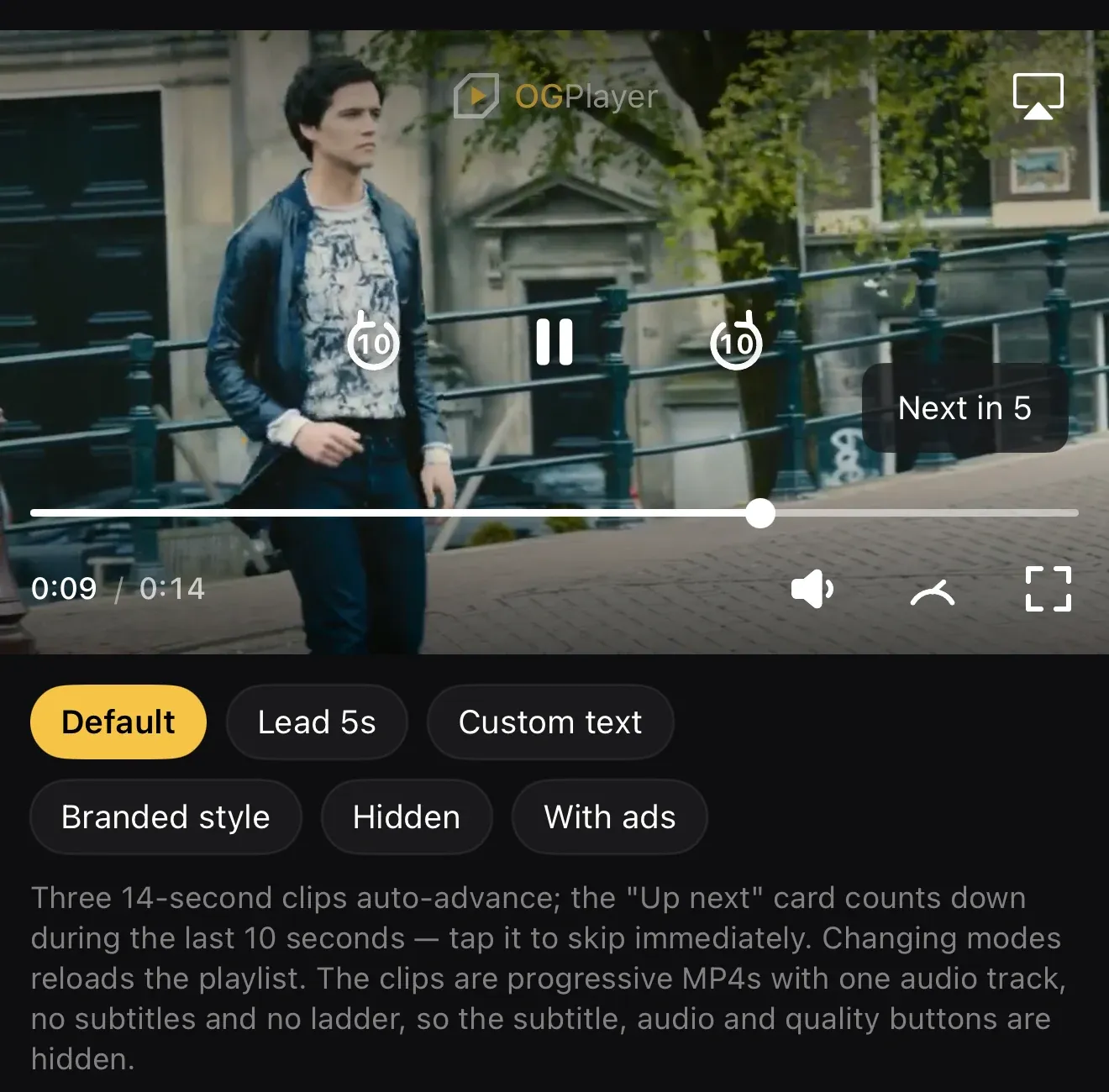
Hand the player a list of videos and it plays them through: when one ends, the next loads automatically — and during the last seconds an “Up next” countdown card appears on the player, which the viewer can tap to skip ahead immediately. Identical API on Android, iOS, web, smart TVs, React Native and Flutter.
Each queue item is a full OGMediaItem, so every item keeps its own
pipeline: its own DRM configuration, its own ad schedule, its own
subtitles and poster. A postroll on the current item always finishes before
the queue advances.
Loading a playlist
Section titled “Loading a playlist”player.loadPlaylist( listOf( OGMediaItem.Builder(episode1Url).setTitle("Episode 1").build(), OGMediaItem.Builder(episode2Url).setTitle("Episode 2").build(), OGMediaItem.Builder(episode3Url).setTitle("Episode 3").build(), ), startIndex = 0, playWhenReady = true,)player.loadPlaylist([ OGMediaItem(urlString: episode1Url, title: "Episode 1")!, OGMediaItem(urlString: episode2Url, title: "Episode 2")!, OGMediaItem(urlString: episode3Url, title: "Episode 3")!,], startIndex: 0, autoplay: true)player.loadPlaylist([ { url: episode1Url, title: "Episode 1" }, { url: episode2Url, title: "Episode 2" }, { url: episode3Url, title: "Episode 3" },], { startIndex: 0, autoplay: true });<OGPlayerView style={styles.player} playlist={[ { url: episode1Url, title: 'Episode 1' }, { url: episode2Url, title: 'Episode 2' }, { url: episode3Url, title: 'Episode 3' }, ]} autoplay/>OGPlayerView( playlist: [ OGMediaItem(url: episode1Url, title: 'Episode 1'), OGMediaItem(url: episode2Url, title: 'Episode 2'), OGMediaItem(url: episode3Url, title: 'Episode 3'), ], autoplay: true,)A plain load() clears any queue; retry() after an error keeps it. The
current state is always readable: playlist, currentPlaylistIndex (−1
without a playlist) and nextPlaylistItem (nil/null on the last item).
skipToNext() jumps to the next item programmatically — it is exactly what
the card’s tap calls.
skipToPrevious() goes back one item (Android, iOS, React Native and Flutter).
Callbacks
Section titled “Callbacks”player.addListener(object : PlaybackListener { override fun onPlaylistItemChanged(index: Int, item: OGMediaItem) { analytics.track("queue_item", index to item.title) } override fun onPlaylistItemSkipped(fromIndex: Int, toIndex: Int) { analytics.track("queue_skip", fromIndex to toIndex) }})final class QueueListener: PlaybackListener { func onPlaylistItemChanged(index: Int, item: OGMediaItem) { analytics.track("queue_item", index, item.title) } func onPlaylistItemSkipped(fromIndex: Int, toIndex: Int) { analytics.track("queue_skip", fromIndex, toIndex) }}player.addListener({ onPlaylistItemChanged: (index, item) => analytics.track("queue_item", index, item.title), onPlaylistItemSkipped: (fromIndex, toIndex) => analytics.track("queue_skip", fromIndex, toIndex),});<OGPlayerView style={styles.player} playlist={playlist} autoplay onPlaylistItemChanged={(index, title) => analytics.track('queue_item', index, title)} onPlaylistItemSkipped={(fromIndex, toIndex) => analytics.track('queue_skip', fromIndex, toIndex)}/>OGPlayerView( playlist: playlist, autoplay: true, onPlaylistItemChanged: (index, title) => analytics.track('queue_item', index, title), onPlaylistItemSkipped: (fromIndex, toIndex) => analytics.track('queue_skip', fromIndex, toIndex),)onPlaylistItemChanged fires for the start item, every auto-advance and
every skip. onPlaylistItemSkipped fires only when the viewer (or your
code) skips via skipToNext() — natural end-of-item advances don’t — so
your analytics can tell an impatient skip from a completed view.
The “Up next” card
Section titled “The “Up next” card”By default the card appears during the last 10 seconds of each item (except the last), bottom-right on the player, showing “Next in 5” and counting down. Tapping it skips immediately. Everything about it is configurable — and it can be turned off entirely while the queue keeps advancing silently.
val uiConfig = OGUiConfig.Builder() .setUpNextLeadSeconds(5) // card window before the end (1–60) .setUpNextText("{title} starts in {seconds}s…") // your copy, any language .setUpNextStyle( backgroundColor = Color(0xE6F6C445), textStyle = TextStyle(color = Color(0xFF131313), fontSize = 13.sp), ) // .setShowUpNext(false) // no card; silent advance .build()var config = OGUIConfig()config.upNextLeadSeconds = 5 // card window before the end (1–60)config.upNextText = "{title} starts in {seconds}s…" // your copy, any languageconfig.upNextBackgroundColor = Color(red: 0.96, green: 0.77, blue: 0.27).opacity(0.9)config.upNextTextFont = .system(size: 13, design: .serif)config.upNextTextColor = Color(red: 0.075, green: 0.075, blue: 0.075)// config.showUpNext = false // no card; silent advanceel.config = { upNextLeadSeconds: 5, // card window before the end (1–60) upNextText: "{title} starts in {seconds}s…", // your copy, any language upNextStyle: "background:rgba(246,196,69,.9);color:#131313;font-family:Georgia,serif", // showUpNext: false, // no card; silent advance};<OGPlayerView style={styles.player} playlist={playlist} autoplay uiConfig={{ upNextLeadSeconds: 5, // card window before the end (1–60) upNextText: '{title} starts in {seconds}s…', // your copy, any language upNextBackgroundColor: '#E6F6C445', upNextTextColor: '#131313', upNextTextSize: 13, upNextFontFamily: 'serif', // showUpNext: false, // no card; silent advance }}/>OGPlayerView( playlist: playlist, autoplay: true, uiConfig: const OGUIConfig( upNextLeadSeconds: 5, // card window before the end (1–60) upNextText: '{title} starts in {seconds}s…', // your copy, any language upNextBackgroundColor: '#E6F6C445', upNextTextColor: '#131313', upNextTextSize: 13, upNextFontFamily: 'serif', // showUpNext: false, // no card; silent advance ),){seconds} and {title} are substituted in the text template. The card is
deliberately configuration-only — there is no custom-view slot for it; if
you need a fully bespoke surface, drive your own UI from
nextPlaylistItem + onProgress and call skipToNext().
Ads in a playlist
Section titled “Ads in a playlist”Ads are configured per item — each queue entry carries its own tag, so a broadcaster can mix monetized and clean content freely:
player.loadPlaylist(listOf( OGMediaItem.Builder(ep1).setAdBreaks(AdTagConfig(vmapPrePost)).build(), OGMediaItem.Builder(ep2).setAdBreaks(AdTagConfig(vastSkippablePreroll)).build(), OGMediaItem.Builder(trailer).build(), // ad-free))player.loadPlaylist([ OGMediaItem(urlString: ep1, adBreaks: AdTagConfig(adTagURI: vmapPrePost))!, OGMediaItem(urlString: ep2, adBreaks: AdTagConfig(adTagURI: vastSkippablePreroll))!, OGMediaItem(urlString: trailer)!, // ad-free])player.loadPlaylist([ { url: ep1, adBreaks: { adTagUri: vmapPrePost } }, { url: ep2, adBreaks: { adTagUri: vastSkippablePreroll } }, { url: trailer }, // ad-free]);<OGPlayerView style={styles.player} playlist={[ { url: ep1, ads: { adTagUrl: vmapPrePost } }, { url: ep2, ads: { adTagUrl: vastSkippablePreroll } }, { url: trailer }, // ad-free ]} adsEnabled autoplay/>OGPlayerView( playlist: [ OGMediaItem(url: ep1, ads: AdsConfig(adTagUrl: vmapPrePost)), OGMediaItem(url: ep2, ads: AdsConfig(adTagUrl: vastSkippablePreroll)), OGMediaItem(url: trailer), // ad-free ], adsEnabled: true, autoplay: true,)The sequencing is broadcaster-grade:
- An item’s postroll always plays before the queue advances — including when the viewer fast-forwards to the end before the ad schedule has even loaded.
- The next item’s preroll plays after the advance, so a skip never lands anyone in ad-free content that shouldn’t be.
- A skip via the card bypasses the current item’s remaining breaks — the
onPlaylistItemSkippedcallback tells your ad decisioning who skipped. - The card never renders over an ad break.
- Playlists are for VOD sequencing; live items can be queued but never end
on their own, so they hold the queue until a
skipToNext(). - The demo apps’ Playlist & up next screen shows every mode side by side — lead time, custom text, branded card, hidden card, and per-item IMA ads.