Vertical feed
OGVerticalFeedView is a swipeable, full-screen vertical video feed built on
the OGPlayer engine — a separate surface from the standard player, portrait-only
by design (it exposes no fullscreen or rotation API; pin your screen to
portrait). Under the hood an internal pool of at most three engine instances
keeps the current item playing while its neighbours sit prepared — muted,
paused, on capped standby buffers — so swipes start instantly and memory stays
predictable.
The feed ships on every platform with the same API names and semantics:
OGVerticalFeedView on Android and iOS, <og-vertical-feed> on the web.
Quick start
Section titled “Quick start”OGVerticalFeedView( items = listOf( OGVerticalFeedItem.Builder( OGMediaItem.Builder("https://cdn.example.com/clips/one.mp4").build(), ) .setPosterUrl("https://cdn.example.com/clips/one.jpg") .setTitle("First clip") .setSubtitle("@creator · What the caption says") .build(), // …more items ),)OGVerticalFeedView(items: [ OGVerticalFeedItem( media: OGMediaItem(urlString: "https://cdn.example.com/clips/one.mp4", title: "First clip")!, posterUrl: URL(string: "https://cdn.example.com/clips/one.jpg"), title: "First clip", subtitle: "@creator · What the caption says" ), // …more items])<og-vertical-feed id="feed"></og-vertical-feed><script type="module"> import "ogplayer"; document.getElementById("feed").items = [ { media: { url: "https://cdn.example.com/clips/one.mp4", title: "First clip" }, posterUrl: "https://cdn.example.com/clips/one.jpg", title: "First clip", subtitle: "@creator · What the caption says", }, // …more items ];</script>import { OGVerticalFeedView } from 'ogplayer-react-native';
<OGVerticalFeedView style={{ flex: 1 }} items={[ { media: { url: 'https://cdn.example.com/clips/one.mp4', title: 'First clip' }, posterUrl: 'https://cdn.example.com/clips/one.jpg', title: 'First clip', subtitle: '@creator · What the caption says', }, // …more items ]}/>import 'package:ogplayer_flutter/ogplayer_flutter.dart';
OGVerticalFeedView( items: const [ OGVerticalFeedItem( url: 'https://cdn.example.com/clips/one.mp4', posterUrl: 'https://cdn.example.com/clips/one.jpg', title: 'First clip', subtitle: '@creator · What the caption says', ), // …more items ],)The feed ships bare by design: video, tap-to-pause, and a progress hairline. Titles, subtitles, rail buttons, badges — everything below is explicit opt-in configuration. The SDK never infers behavior from content.
Each OGVerticalFeedItem carries its media plus feed-specific presentation:
setPosterUrl— shown for pages outside the player window (and until first frame)setTitle/setSubtitle— rendered only when the config enables themsetRailActions— up to six host buttons for the right rail (see below)setSponsored(true)— marks an ad item (see Sponsored items)setContentFit— per-itemFILL(crop, default) orFIT(letterbox)setTextPlacement—OVERLAY(default), or the split layouts belowsetSecondaryMedia/setSplitAudioSource— the split-video layout below
On iOS the same properties are init parameters on the OGVerticalFeedItem
struct (posterUrl:, title:, subtitle:, railActions:, isSponsored:,
contentFit:, textPlacement:, secondaryMedia:, splitAudioSource:), and
OGVerticalFeedConfig is a plain struct — set var config = OGVerticalFeedConfig() properties directly instead of using a builder. On
the web, items and config are plain objects with the same property names,
assigned to the element (feed.items = […], feed.config = {…}); events
arrive as DOM CustomEvents (og-activeitemchanged, og-nearend,
og-itemskipped, og-itemerror, og-analytics, og-mutedfallback), and
the sponsoredBadge / errorOverlay slots are properties returning DOM
elements.
Layouts
Section titled “Layouts”One component, three page layouts, chosen per item:
Vertical (default) — the video fills the page; title/subtitle overlay bottom-left when enabled.
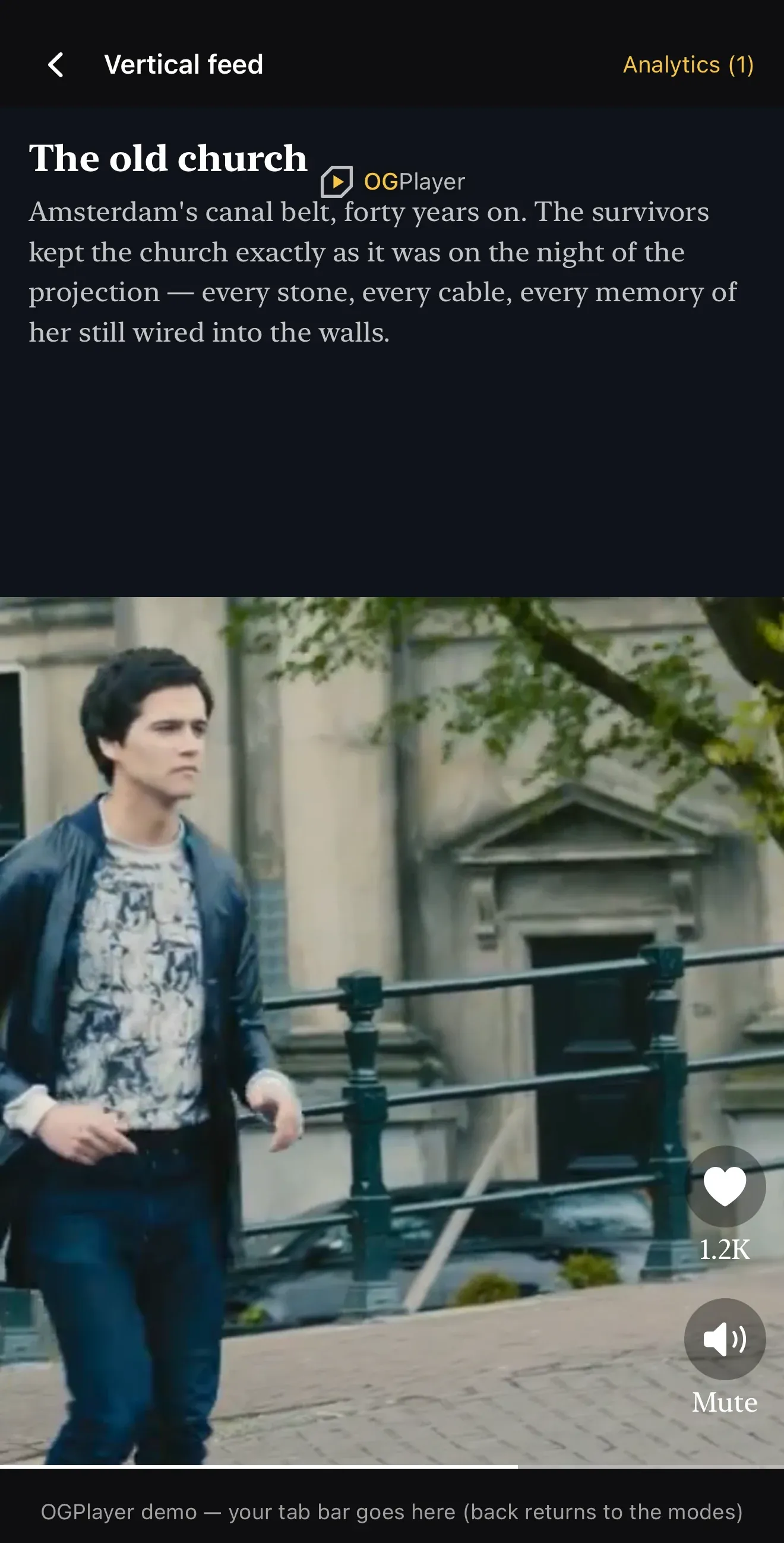
Split screen: text + video — the page splits into a text section and a video section. Made for footage that shouldn’t be cropped to portrait: the text lives in its own band, never over the picture.
OGVerticalFeedItem.Builder(media) .setTitle("Headline") .setSubtitle("A longer description — up to six lines in the band.") .setTextPlacement(TextPlacement.ABOVE_VIDEO) // or BELOW_VIDEO .build()OGVerticalFeedItem( media: media, title: "Headline", subtitle: "A longer description — up to six lines in the band.", textPlacement: .aboveVideo // or .belowVideo){ media, title: "Headline", subtitle: "A longer description — up to six lines in the band.", textPlacement: "ABOVE_VIDEO", // or "BELOW_VIDEO"}{ media, title: 'Headline', subtitle: 'A longer description — up to six lines in the band.', textPlacement: 'ABOVE_VIDEO', // or 'BELOW_VIDEO'}OGVerticalFeedItem( url: url, title: 'Headline', subtitle: 'A longer description — up to six lines in the band.', textPlacement: OGFeedTextPlacement.aboveVideo, // or .belowVideo)Sizing and styling are feed-level config: setTextBandFraction(0.15f..0.5f)
(default one third), setTextBandColor, setTextBandTopMargin,
setTextFontFamily, setTitleTextSize, setSubtitleTextSize.
Split video: two sources — two videos on one page, stacked. The primary plays on top and owns scrubbing, progress and analytics; the secondary plays below, starts in the same frame as the primary (the feed synchronizes their start), and pauses/resumes with it. Exactly one half is audible:
OGVerticalFeedItem.Builder(topMedia) .setSecondaryMedia(bottomMedia) .setSplitAudioSource(SplitAudioSource.SECONDARY) // bottom half owns audio .build()OGVerticalFeedItem( media: topMedia, secondaryMedia: bottomMedia, splitAudioSource: .secondary // bottom half owns audio){ media: topMedia, secondaryMedia: bottomMedia, splitAudioSource: "SECONDARY", // bottom half owns audio}{ media: topMedia, secondaryMedia: bottomMedia, splitAudioSource: 'SECONDARY', // bottom half owns audio}OGVerticalFeedItem( url: topUrl, secondaryUrl: bottomUrl, splitAudioSource: OGFeedSplitAudioSource.secondary, // bottom half owns audio)Pair clips of equal duration — both halves loop on their own timelines, so matched lengths keep their restarts together. The secondary player exists only while its page is on screen and never consumes the preload budget.
The rail
Section titled “The rail”The right rail is an empty placeholder the host fills — the SDK ships no
built-in buttons there. A RailAction is an icon, an optional label (a
count, a state word), an isActive flag and a click handler; update state by
re-supplying the items list:
RailAction( iconRes = R.drawable.ic_like, label = "12.4K", isActive = liked, onClick = { toggleLike() },)RailAction( icon: Image(systemName: "heart.fill"), label: "12.4K", isActive: liked) { toggleLike() }{ iconSvg: '<svg viewBox="0 0 24 24">…</svg>', label: "12.4K", isActive: liked, onClick: () => toggleLike(),}iconName references an icon by name from your app’s native resources — an
Android drawable / iOS asset-catalog entry, not a JS import. Taps arrive on
the view’s onRailAction:
{ iconName: 'ic_like', label: '12.4K', isActive: liked, accessibilityLabel: 'Like',}<OGVerticalFeedView items={items} onRailAction={(itemIndex, actionIndex) => toggleLike(itemIndex)}/>iconName references an icon by name from your app’s native resources — an
Android drawable (prefix it og_ so release shrinking keeps it) / iOS
asset-catalog entry, not a Flutter asset. Taps arrive on the view’s
onRailAction:
FeedRailAction( iconName: 'og_ic_like', label: '12.4K', isActive: liked, accessibilityLabel: 'Like',)OGVerticalFeedView( items: items, onRailAction: (itemIndex, actionIndex) => toggleLike(itemIndex),)In split layouts the rail anchors inside the video section, never over text.
Playback chrome
Section titled “Playback chrome”- Tap = instant pause with a center glyph (replaceable via
setPlayIconReson Android,config.playIconon iOS,playIconSvgon the web); a spinner shows while loading — the glyph strictly means “viewer paused”. onItemDoubleTapped— a plain callback; the SDK attaches no meaning. When set, single-tap pause waits ~300 ms for gesture disambiguation.- The progress hairline scrubs — drag anywhere on it, no thumb. Configure
with
setShowProgressBar,setProgressBarThickness,setProgressBarColor,setProgressBarTrackColor.
Feed state & mute
Section titled “Feed state & mute”val state = rememberOGVerticalFeedState()OGVerticalFeedView(items = items, state = state)// anywhere in your UI:state.isMuted = true // sticky across swipes; applies to the audible halfval index = state.currentIndex@StateObject var state = OGVerticalFeedState()
OGVerticalFeedView(items: items, state: state)// anywhere in your UI:state.isMuted = true // sticky across swipes; applies to the audible halflet index = state.currentIndex// anywhere in your app:feed.muted = true; // sticky across swipes; applies to the audible halfconst index = feed.currentIndex;const [muted, setMuted] = useState(false);const [index, setIndex] = useState(0);
<OGVerticalFeedView items={items} muted={muted} // sticky across swipes; applies to the audible half onActiveItemChanged={setIndex}/>bool muted = false;int index = 0;
OGVerticalFeedView( items: items, muted: muted, // sticky across swipes; applies to the audible half onActiveItemChanged: (i) => setState(() => index = i),)There is no built-in mute button — muting is host UI, one line of state.
Sponsored items
Section titled “Sponsored items”Feed advertising works the way vertical feeds work everywhere: the ad is a
native feed item your server inserts into the list. Mark it
setSponsored(true) and the SDK renders the default “Sponsored” chip, never
loops it, and auto-advances to the next item when it ends. Customize with
setShowSponsoredBadge(false) or replace the chip via the view’s
sponsoredBadge { item -> … } slot. VAST/IMA ad breaks intentionally do not
exist inside the feed — that model belongs to the standard player.
Pagination & events
Section titled “Pagination & events”The SDK never fetches feed data. Listen and append:
OGVerticalFeedView( items = items, onNearEnd = { remaining -> viewModel.loadNextPage() }, onActiveItemChanged = { index, item -> /* … */ }, onItemSkipped = { index, reason -> /* e.g. durationExceeded */ },)OGVerticalFeedView( items: items, onActiveItemChanged: { index, item in /* … */ }, onNearEnd: { remaining in model.loadNextPage() }, onItemSkipped: { index, reason in /* e.g. durationExceeded */ })feed.addEventListener("og-nearend", (e) => loadNextPage(e.detail.remaining));feed.addEventListener("og-activeitemchanged", (e) => { /* e.detail.index, .item */ });feed.addEventListener("og-itemskipped", (e) => { /* e.g. durationExceeded */ });<OGVerticalFeedView items={items} onNearEnd={(remaining) => loadNextPage()} onActiveItemChanged={(index) => { /* … */ }} onItemSkipped={(index, reason) => { /* e.g. durationExceeded */ }}/>OGVerticalFeedView( items: items, onNearEnd: (remaining) => loadNextPage(), onActiveItemChanged: (index) { /* … */ }, onItemSkipped: (index, reason) { /* e.g. durationExceeded */ },)setMaxItemDurationSeconds rejects over-long items at prepare time — they
never buffer media and are skipped with an onItemSkipped callback.
Error handling
Section titled “Error handling”The feed mirrors the standard player’s three levels of error control, feed-shaped:
OGVerticalFeedView(    items = items,    // 1. The callback — same error object as the standard player's onError,    //    plus which feed item it hit.    onItemError = { index, error -> log(index, error) },    // 3. Or your whole error UI on the failed page (the feed counterpart of    //    the standard player's errorOverlay slot).    errorOverlay = { error, retry ->        YourErrorPanel(code = error.code, onTryAgain = retry)    },)
// 2. Or just your copy on the SDK's default error state:OGVerticalFeedConfig.Builder() .setErrorMessageProvider { error -> "Oeps — fout ${error.code}" } .build()OGVerticalFeedView( items: items, // 1. The callback — same error object as the standard player's onError, // plus which feed item it hit. onItemError: { index, error in log(index, error) }, // 3. Or your whole error UI on the failed page (the feed counterpart of // the standard player's errorOverlay slot). errorOverlay: { error, retry in AnyView(YourErrorPanel(code: error.code, onTryAgain: retry)) })
// 2. Or just your copy on the SDK's default error state:var config = OGVerticalFeedConfig()config.errorMessageProvider = { error in "Oeps — fout \(error.code)" }// 1. The callback — same error object as the standard player's onError.feed.addEventListener("og-itemerror", (e) => log(e.detail.index, e.detail.error));
// 3. Or your whole error UI on the failed page.feed.errorOverlay = (error, retry) => { const panel = buildYourErrorPanel(error.code); panel.querySelector("button").addEventListener("click", retry); return panel;};
// 2. Or just your copy on the SDK's default error state:feed.config = { errorMessageProvider: (error) => `Oeps — fout ${error.code}`,};<OGVerticalFeedView items={items} onItemError={(index, error) => log(index, error)}/>The custom errorOverlay slot and errorMessageProvider are not available
in React Native — failed pages show the SDK’s default error surface.
OGVerticalFeedView( items: items, onItemError: (index, error) => log(index, error),)The custom errorOverlay slot and errorMessageProvider are not available
in Flutter — failed pages show the SDK’s default error surface.
Without customization, a failed page shows the SDK’s compact default —
dimmed surface, message, Retry — styled with the feed’s font and text-size
config. Errors also arrive in the analytics stream as the standard
AnalyticsEvent.Error. A failed page never blocks the feed: swiping past it
always works, and that is the feed-native recovery gesture.
Feed analytics
Section titled “Feed analytics”Feed behaviour reports through the same AnalyticsEvent family as playback,
with a VerticalFeed prefix so mappers can separate the two:
| Event | When |
|---|---|
VerticalFeedImpression(index, url) | an item became the visible page |
VerticalFeedItemLooped(index, loopCount) | the active item restarted |
VerticalFeedItemWatched(index, url, watchTimeMs, loopCount) | the item left the screen — true watch-time, loops included |
OGVerticalFeedView(items = items, onAnalyticsEvent = { event -> analytics.track(event) })OGVerticalFeedView(items: items, onAnalyticsEvent: { event in analytics.track(event) })feed.addEventListener("og-analytics", (e) => analytics.track(e.detail.event));<OGVerticalFeedView items={items} onAnalyticsEvent={(event) => analytics.track(event)}/>OGVerticalFeedView( items: items, onAnalyticsEvent: (event) => analytics.track(event),)Memory & performance
Section titled “Memory & performance”The pool holds at most preloadAhead + keepBehind + 1 (≤ 3) engine
instances. Preloaded neighbours buffer on a capped standby profile
(8 MB / 10 s) and switch to full buffering only when promoted. Items outside
the window are recycled without tearing down decoders; everything is released
when the feed leaves the screen. On low-end targets set
setPreloadAhead(0) explicitly. Encode feed content for feeds — 540p at
around 1 Mbps is the norm for full-screen portrait clips.
Not in the feed (by design)
Section titled “Not in the feed (by design)”DRM-protected items (untested in the pool in this release), VAST/IMA breaks, PiP and casting, landscape orientation of any kind. The standard player covers all of these.